

Client communication
ClientDesk — Client Messaging & Projects
One chat per client with your whole team in it — and the projects, tasks and payments right next to the conversation.
- Status Ready to deploy
- Screens shown 5 real captures
- Built with PHP 8 · SQLite or MySQL · Native Android app
- 3 kinds of chat: personal, group and business
- 2 apps: native Android and an installable web app
- 0 per-seat fees — it runs on your own hosting
ClientDesk is built for a familiar mess: client work run in WhatsApp groups, with the price in one message, the deadline in another and the payment screenshot somewhere above both. Nobody could say where a project stood without scrolling.
The chat is the project file
Every client gets one business chat with your whole team in it. The projects for that client live inside the same chat — tasks ticked off, a progress figure, the agreed price, each payment received and what is still owed. When a payment is recorded, the chat says so. The client sees the same picture you do.
Personal stays personal
People also use it for ordinary conversations, so personal chats, groups and business chats are separated on screen and labelled. Accounts work like Telegram: people find each other by @id or e-mail, and choose who can see their phone number, add them to groups, or see when they were last online.
Your own, on your own hosting
It is plain PHP with SQLite or MySQL, so it installs on the same shared hosting as a WordPress site. The Android app is native, not a wrapped web page; on iPhone the web version installs to the home screen and opens full screen. Can we set it up under your name? Yes — the branding is a setting, not a rebuild.
The real thing
Every screen below is the running software
Captured from a working instance loaded with demonstration data — no mock-ups, and no customer records.
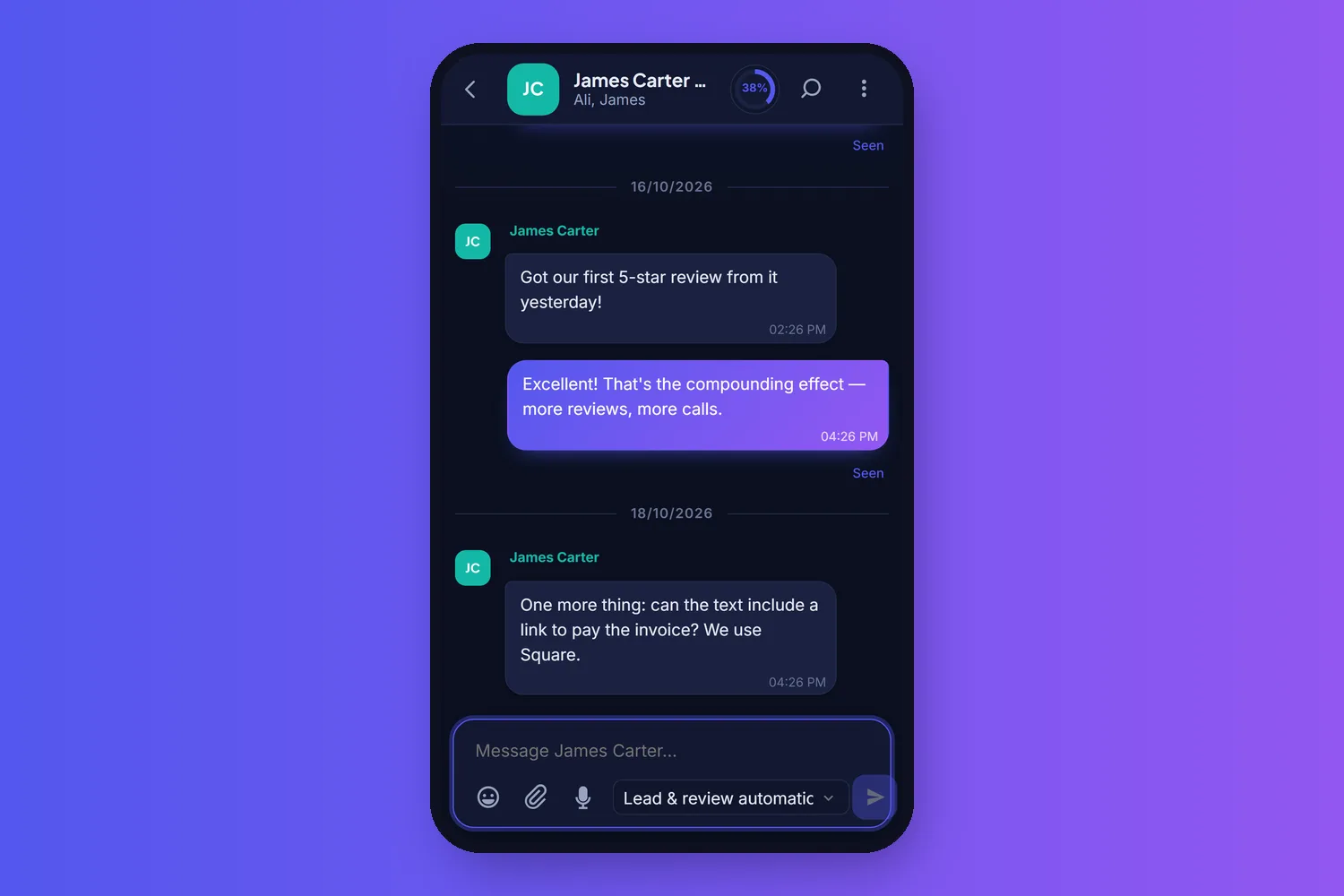
-
01
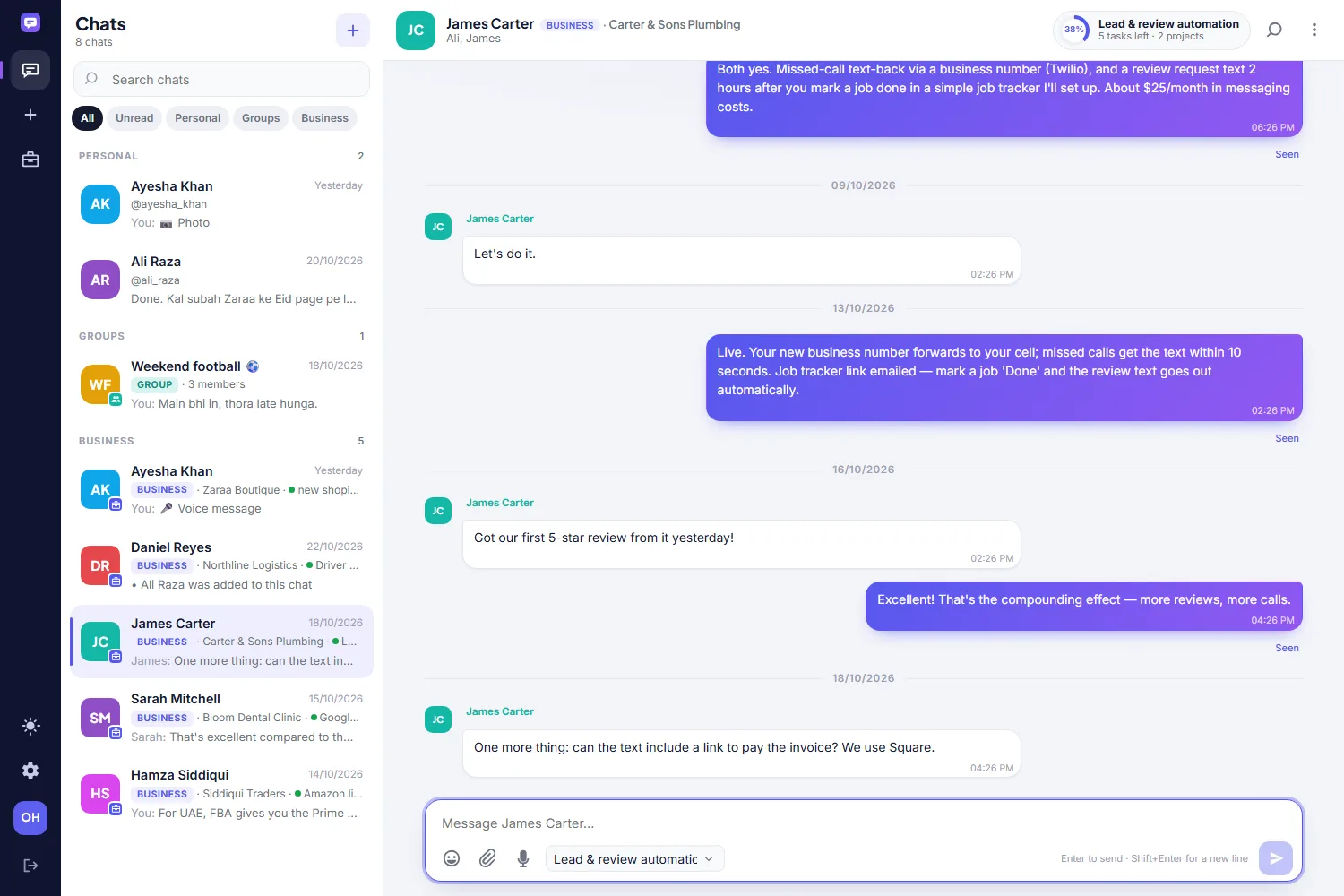
Business chat
One chat per client, with the whole team in it. The current project and its progress sit in the header of the conversation.
-
02
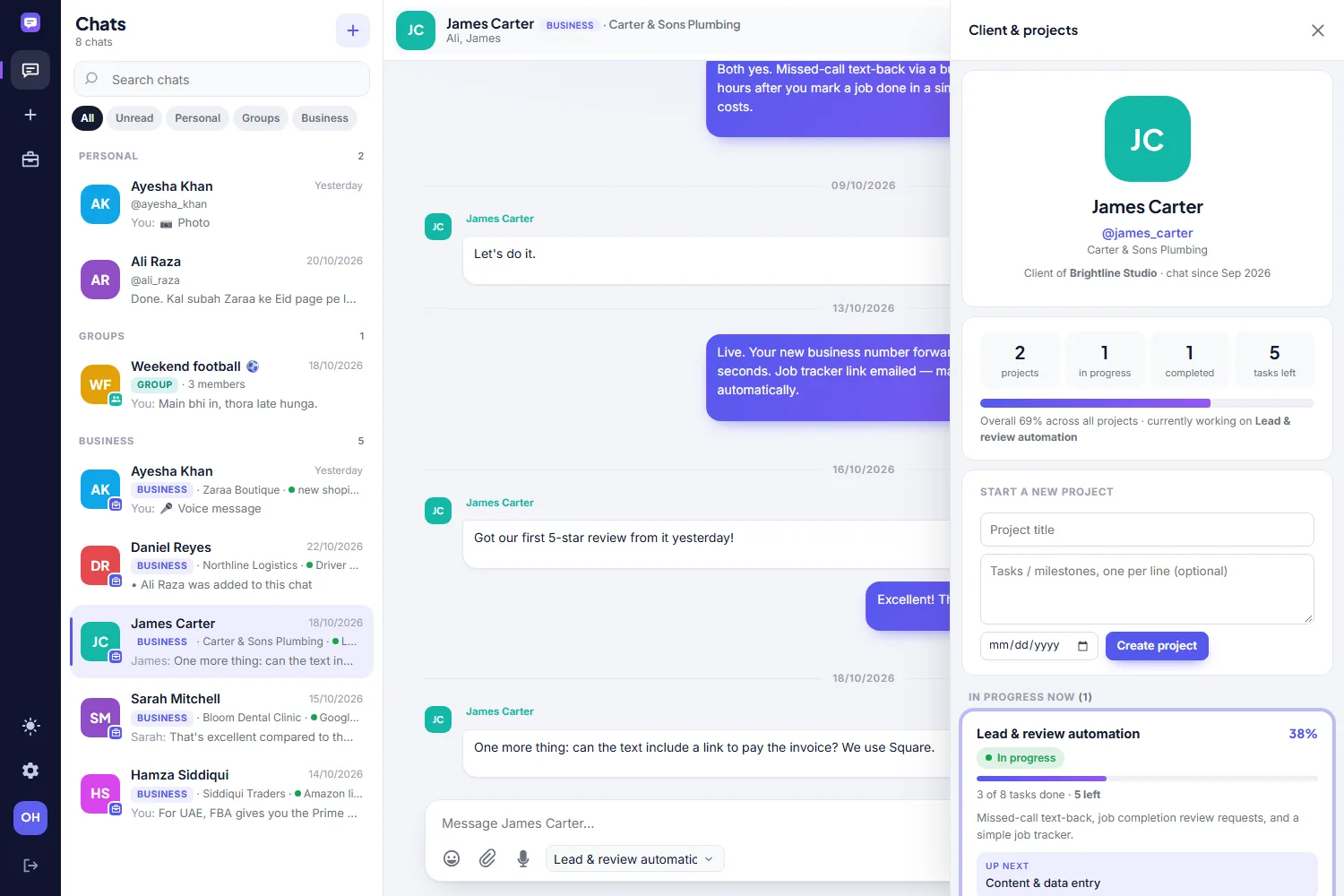
Client & projects
Every project for this client — progress, tasks left, what is up next — opened from the chat without leaving it.
-
03
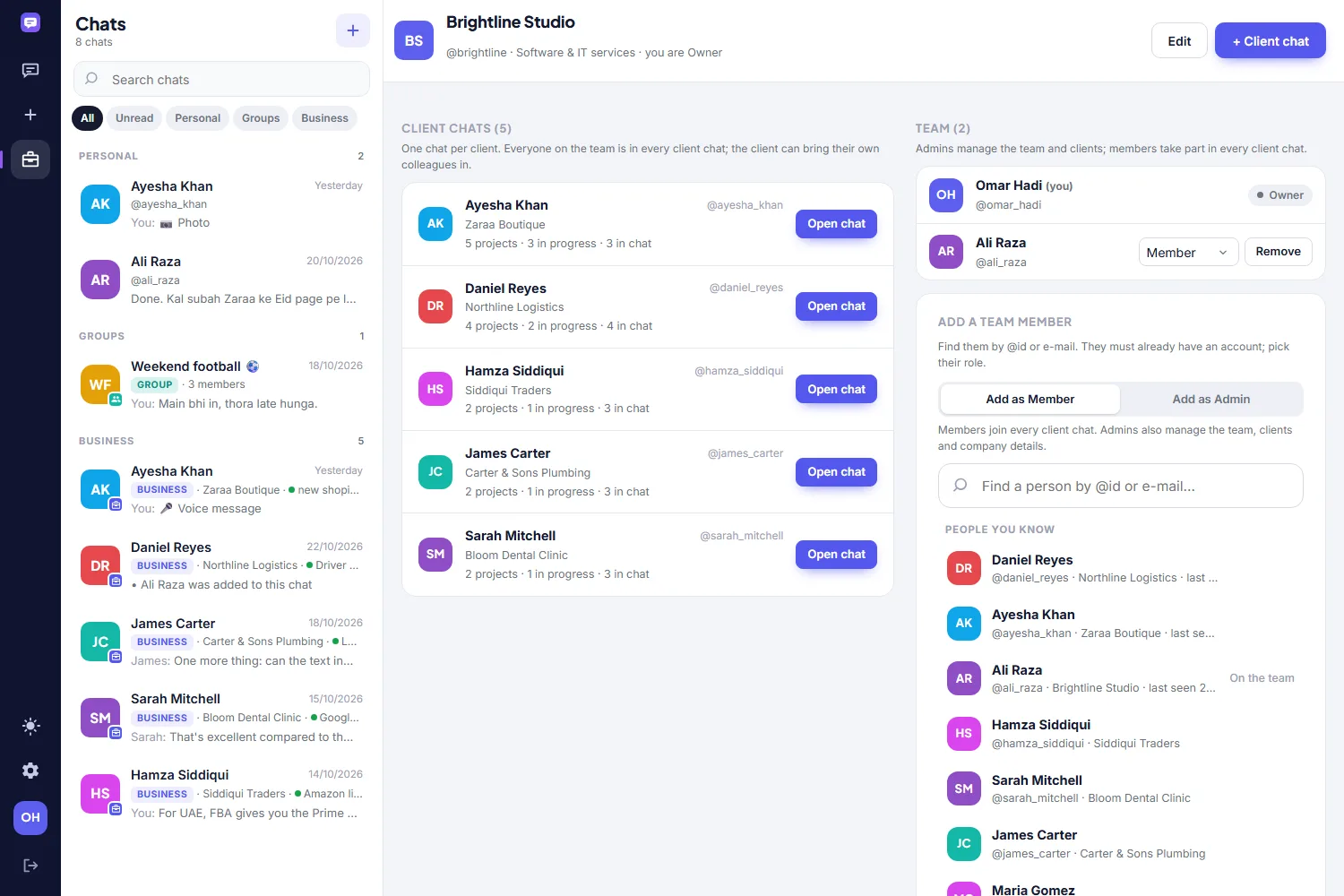
Business account
The company’s client chats and its team, with owner, admin and member roles.
-
04
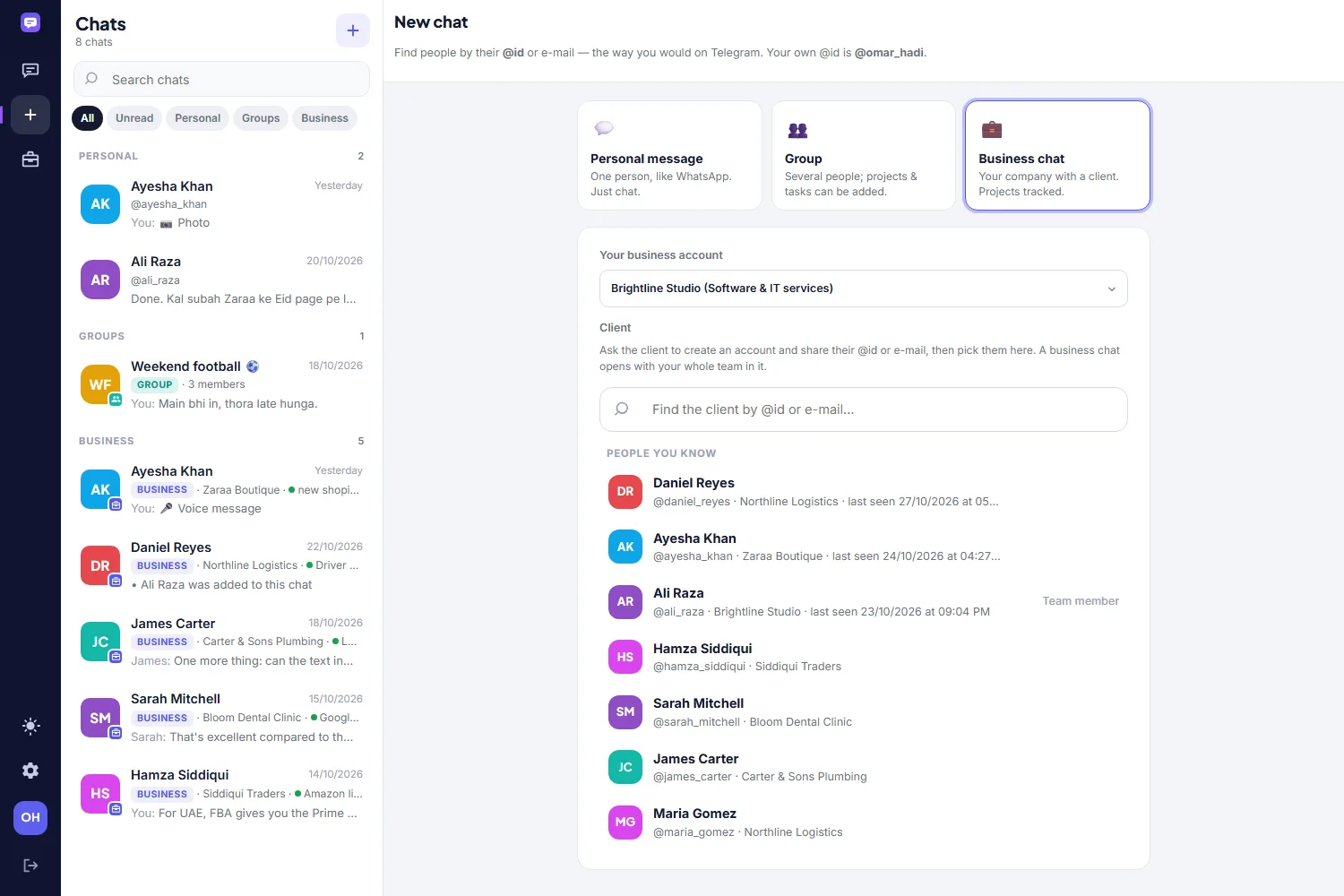
Start a chat
Personal, group or business — each explained in one line, and people found by @id or e-mail.
-
05
On the phone
The same chat on a phone, in dark mode. Demo company and clients throughout; every name is invented.
Every screen, side by side — click one to open it full size.
What is inside
The modules that ship with it
Each one is a working screen with its own entry forms and reports, not a line on a roadmap.
Chats
Personal, group and business chats, sectioned and labelled so they never blur together.
Business accounts
Your company with a category, an @id and a team of owners, admins and members.
Client chats
One chat per client; the whole team is in it and the client can bring their own colleagues.
Projects & tasks
Projects inside the chat with tasks, progress, due dates and what is up next.
Payments
Agreed price, each payment received and the balance, announced in the chat when recorded.
Media
Photos, files and voice notes, with replies, reactions, edits, stars and forwarding.
People & privacy
Find people by @id or e-mail; choose who sees your phone, adds you to groups or sees you online.
Devices
Signed in on several phones and browsers at once, each one listed and revocable.
Android app
A native app, not a wrapped web page, using the same accounts and data.
Also true of it
- Personal chats, groups and business chats, kept visibly apart so a client conversation never gets lost among personal ones.
- A business account for your company: team members with roles, and one shared chat per client that everyone on the team sees.
- Projects inside the client chat — tasks, progress, price, payments received and balance, updated in the chat as they change.
- Photos, files and voice notes, replies, reactions, edits, read receipts and typing indicators.
- Sign-in by e-mail or @id on several devices, with Telegram-style privacy: your e-mail and phone stay hidden unless you allow them.
- Runs on ordinary shared hosting — no separate chat server, no per-seat SaaS bill.
How it is built
Boring technology, on purpose
Nothing here rests on a framework that will be abandoned in two years or on a hosting bill that grows with your success. It runs on an ordinary server, it backs up with ordinary tools, and the data stays yours.
- PHP 8
- SQLite or MySQL
- Native Android app
- Installable web app for iPhone
Our other software

Hospital Management System
One system for registration, OPD, billing, cash and pharmacy — built for a working hospital, not a demo.
Read more
HemoDesk — Blood Bank Software
Every bag from donor to patient, screened, tracked and issued — with a QR on the slip that anyone can verify on your website.
Read more
ResellerDesk — AI Sales Agent & CRM
An assistant that answers every enquiry on your website, WhatsApp, Telegram and e-mail, sets up the trial, takes the payment and keeps the customer record.
Read more